Choosing the right capture card can make a church livestream more reliable, easier to operate, and better suited to your cameras, switchers, and streaming computer. The best option depends on your video inputs, resolution goals, audio workflow, and whether you need one source or several.
This roundup includes straightforward USB capture devices, SDI and HDMI options, multi-input production hardware, and PCIe solutions for demanding installations. Use the guide below to match the features to your worship-streaming setup.
Best 10 Capture Cards for Church Streaming Picks for 2026
Best Uncompressed Capture

- SDI and HDMI inputs
- Uncompressed 1080p60 capture
- USB 3.0 plug-and-play operation
Best For: Single-camera church streaming setups
Best for Simple HDMI Capture

- 4K60 video capture
- HDR10 support
- 3.5mm analog audio input
Best For: HDMI-based church streaming systems
Best All-in-One Multi-Camera Station
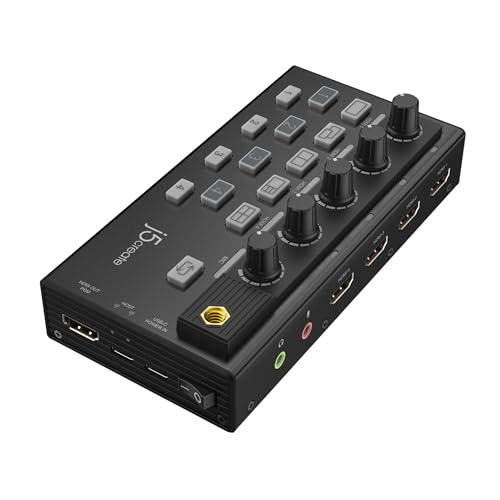
- Four simultaneous HDMI inputs
- Five viewing configurations
- Individual audio volume controls
Best For: Multi-camera church productions
Best 4K Multi-Input Capture
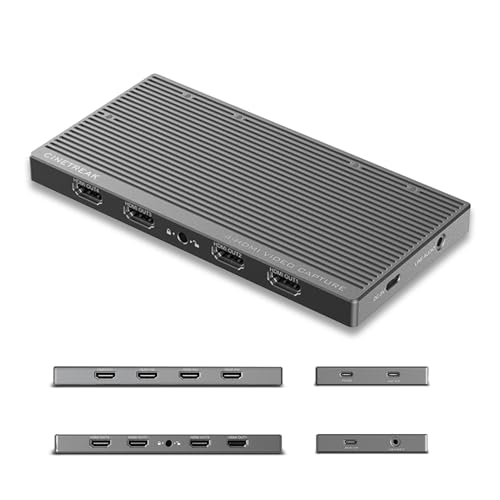
- Four-channel 4K30 capture
- Independent OBS camera feeds
- Stereo line-in and USB 3.2
Best For: Advanced multi-source church streaming
Compact 4K Pick

- Captures up to 4K at 30 fps
- USB-C with USB-A adapter included
- Compact and driver-free
Best For: Portable church streaming setups using HDMI cameras
Budget Plug-and-Play Option
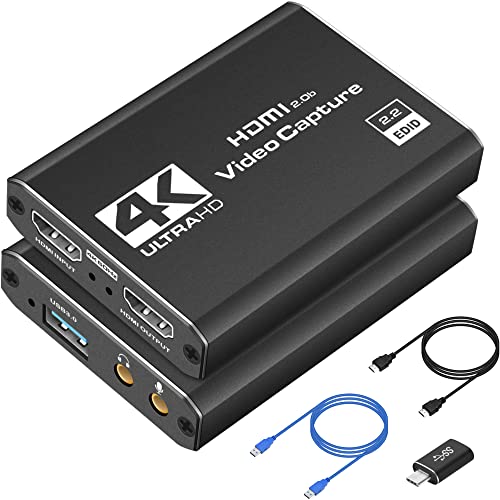
- Captures 1080p at 60 fps
- 4K HDMI real-time preview
- Works with Windows and macOS
Best For: Simple, affordable 1080p church broadcasts
Professional PCIe Solution
Magewell Pro Capture HDMI 11040

- Low-latency PCIe Gen2 x1 capture
- HDMI and analog input support
- Works with Windows, macOS, and Linux
Best For: Permanent church production workstations
Best Plug-and-Play Pick
Redragon VC321 4K Capture Card
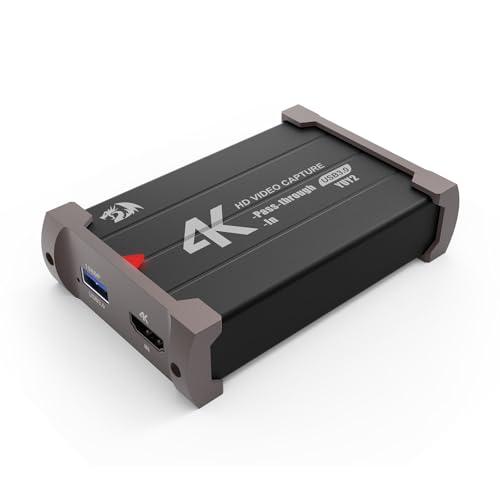
- 1080p capture at 60fps
- 4K input with zero-latency pass-through
- Plug-and-play Windows and Mac support
Best For: Single-camera church streaming setups
Best for Flexible Multi-Input Setups
UNISHEEN UC5000 HDMI Capture Card

- Dual HDMI functionality with loop-through
- Picture-in-picture and side-by-side modes
- Multiple audio input and output options
Best For: Church teams needing source switching and audio flexibility
Best for SDI-Based Systems
ACHAVE SDI USB 3.0 Capture Card

- 1080p60 SDI-to-USB capture
- HDMI loop-out for monitoring
- Plug-and-play support across major operating systems
Best For: Churches using SDI cameras and professional cabling
Best Uncompressed Capture – AVMATRIX UC2018-K
The AVMATRIX UC2018-K is a practical choice among capture cards for church streaming when you need to bring an SDI or HDMI source into a computer. It captures uncompressed YUY2 video up to 1080p60, includes line-in audio, and uses USB 3.0 for a compact, driver-free setup.
Best For: Churches streaming a single camera or video source through OBS, Zoom, Teams, or another compatible platform.
Pros:
- Supports SDI and HDMI input with video and audio capture.
- Uncompressed YUY2 capture up to 1080p60.
- Plug-and-play compatibility with Windows, macOS, and Linux.
- Compact design with a stated two-year guarantee and lifetime technical support.
Cons:
- Limited to a single video input.
- Requires a computer with a USB 3.0 port.
- Does not provide the multi-camera switching features of larger production stations.
For a straightforward one-source church broadcast, the UC2018-K offers useful SDI/HDMI flexibility and uncompressed 1080p60 capture without requiring additional drivers. Its single-input design is best suited to simpler streaming systems.
Best for Simple HDMI Capture – Elgato 4K S
The Elgato 4K S is a compact HDMI capture card for church streaming systems built around a computer, tablet, or compatible video source. It supports 4K60 capture, HDR10, and high-frame-rate passthrough while connecting through USB-C.
Best For: Churches that want a polished HDMI capture device with high-resolution support and near-zero-latency passthrough.
Pros:
- Captures video at up to 4K60.
- Supports HDR10 with tone mapping on Windows.
- Offers 1440p120 or 1080p240 passthrough for responsive monitoring.
- Includes a 3.5mm analog audio input.
Cons:
- Its listed platform support centers on Windows 11, macOS 13 or later, and iPadOS with USB-C.
- Uses HDMI rather than SDI input.
- Some listed high-frame-rate features are more relevant to gaming than typical church broadcasts.
The 4K S is a strong fit when the church’s source equipment is HDMI-based and the streaming computer meets its requirements. Its high-resolution capture and audio input provide flexibility, though it is not designed as a multi-camera switcher.
Best All-in-One Multi-Camera Station – j5create JVA08
The j5create JVA08 is designed for churches that need more than a single input. This all-in-one station captures four HDMI sources simultaneously, provides several viewing layouts, and adds individual audio controls for a more manageable multi-camera production.
Best For: Church services using multiple HDMI cameras, computers, or presentation sources in one live production.
Pros:
- Captures uncompressed 1080p video from four HDMI sources simultaneously.
- Provides Single, PIP, PBP, Quad View, and 1+3 viewing modes.
- Includes separate volume controls for four HDMI sources and a 3.5mm input.
- Plug-and-play operation works with OBS, XSplit, and CameraFi.
Cons:
- Designed around HDMI sources and does not list SDI inputs.
- Its 1080p capture specification is below the 4K capability of some newer devices.
- More equipment than needed for a basic single-camera stream.
For a multi-source church broadcast, the JVA08 combines capture, layout selection, and audio adjustment in one compact unit. It can simplify a multi-camera workflow, although smaller ministries may not need all of its inputs.
Best 4K Multi-Input Capture – CINETREAK CT-4
The CINETREAK CT-4 is a feature-rich option for churches building a multi-source streaming workflow. It accepts four HDMI inputs, creates four independent network cameras in OBS, and adds stereo line-in audio plus USB 3.2 Gen 2 connectivity.
Best For: Churches and production teams combining several HDMI sources with professional audio equipment in OBS or vMix.
Pros:
- Supports simultaneous capture from four HDMI inputs at up to 4K30.
- Creates four independent network cameras in OBS for flexible source control.
- Includes stereo line-in for a mixer or audio interface.
- Offers UVC plug-and-play compatibility and 10Gbps USB 3.2 transmission.
Cons:
- Requires a USB 3.2 port and a relatively capable computer.
- Its 4K capture specification is listed at 30 fps rather than 60 fps.
- At 400 g, it is less lightweight than a basic single-input capture card.
The CT-4 stands out when a church needs independent control of multiple HDMI feeds and a direct connection to professional audio gear. It offers substantial production flexibility, but its system requirements and four-input design are better suited to a dedicated streaming setup.
Compact 4K Pick – j5create 4K HDMI Capture Card
For church streaming setups that need a portable capture card with strong resolution support, the j5create 4K HDMI Video Capture Card offers HDMI input, USB-C 3.2 connectivity, and compatibility with popular software including OBS, XSplit, CameraFi, and QuickTime. It can capture 4K at 30 fps, 2K at 60 fps, or 1080p at 120 fps without requiring driver installation.
Best For: Churches using a camera or other HDMI source with a computer-based streaming workflow, especially when portability and high-resolution capture matter.
Pros:
- Supports 4K30, 2K60, and 1080p120 capture.
- USB-C 3.2 connection includes a USB Type-A adapter for broader compatibility.
- Works with several streaming and recording applications without driver installation.
- Compact design is convenient for mobile services, events, or storage.
Cons:
- Offers one HDMI input channel.
- Requires a compatible HDMI source and computer for streaming.
The j5create is a flexible choice for a church team that wants a small, easy-to-deploy capture device with more than enough resolution for most live broadcasts. Its included adapter and software support can simplify setup across different computers.
Budget Plug-and-Play Option – Dcyfol 4K HDMI Capture Card
For churches looking for straightforward capture cards for church streaming, this Dcyfol USB 3.0 model combines plug-and-play setup with 1080p at 60 fps capture and 4K HDMI real-time preview. It works with Windows and macOS and supports software such as OBS Studio, Streamlabs, and XSplit.
Best For: Beginner-friendly church broadcasts using an HDMI camera, computer, or other compatible source with a USB 3.0 computer connection.
Pros:
- Captures 1080p video at 60 fps and supports 4K HDMI preview.
- Plug-and-play design requires no driver installation.
- Compatible with Windows, macOS, OBS Studio, Streamlabs, and XSplit.
- Includes USB and USB-C connection accessories and HDMI loop-out support.
Cons:
- Requires a USB 3.0 port.
- Its listed capture output is 1080p60 rather than 4K capture.
This model makes sense when a church prioritizes simple setup and smooth 1080p broadcasting over native 4K recording. The included adapters and broad device compatibility may also help teams working with varied computers and HDMI sources.
Professional PCIe Solution – Magewell Pro Capture HDMI 11040
For established church production systems, the Magewell Pro Capture HDMI 11040 is a professional PCIe capture card designed for one HDMI source with embedded audio. Its direct PCIe Gen2 x1 connection supports low-latency ingest, while Windows, macOS, and Linux support makes it suitable for dedicated streaming, recording, and production computers.
Best For: Churches with a desktop production workstation, an available PCIe slot, and a need for stable, customizable HDMI capture.
Pros:
- Direct PCIe connection is designed for stable, low-latency capture.
- Supports HDMI plus component, composite, S-video, and analog audio through the breakout cable.
- Handles 8-, 10-, and 12-bit color depth and multiple color spaces.
- Supports hardware-based scaling, cropping, de-interlacing, and frame-rate conversion through SDK control.
Cons:
- Requires a compatible computer with an available PCIe slot.
- Designed for internal installation rather than portable use.
- Captures one HDMI source.
The Magewell is a stronger fit for a permanent church media room than a laptop-based setup. Its professional input flexibility and processing features offer room for more advanced workflows, provided the production computer meets the PCIe and operating-system requirements.
Best Plug-and-Play Pick – Redragon VC321 4K Capture Card
The Redragon VC321 is a straightforward option for church streaming setups that use an HDMI camera, DSLR, or similar source. It captures up to 1080p at 60fps, accepts up to 4K at 30fps, and includes zero-latency HDMI pass-through for monitoring.
Best For: Churches wanting an easy USB capture card for a single HDMI camera and 1080p livestreaming.
Pros:
- Captures 1080p video at up to 60fps.
- Supports 4K 30fps input with HDMI pass-through.
- Plug-and-play design works with Windows and macOS without extra drivers or power.
- Captures HDMI video and audio simultaneously.
Cons:
- Capture resolution is limited to 1080p.
- Pass-through and input features require HDMI-compatible equipment.
For a typical church streaming workstation, the VC321 emphasizes simple installation and responsive monitoring. Its 1080p60 capture is well suited to live services, while broad camera and computer compatibility makes it flexible for basic setups.
Best for Flexible Multi-Input Setups – UNISHEEN UC5000 HDMI Capture Card
The UNISHEEN UC5000 is designed for church streaming teams that need more than a basic HDMI-to-USB connection. It offers dual HDMI functionality, switchable picture-in-picture and side-by-side displays, 1080p capture, and multiple audio connections.
Best For: Churches that need flexible HDMI switching, monitoring, and microphone connectivity for streaming or teaching.
Pros:
- Supports up to 2160p at 60Hz input and provides HDMI loop-through.
- Offers channel switching, picture-in-picture, and side-by-side display modes.
- Includes HDMI, line-in, mic-in, and line-out audio connections.
- Works with Windows and Linux and supports third-party software such as OBS.
Cons:
- Capture resolution is listed as 1080p, despite higher-resolution input support.
- Mic input accepts a 3.5mm headset connection.
- The maximum loop-through output is listed as 1080p at 60Hz.
The UC5000 stands out when a church production needs source flexibility or presentation layouts beyond a single full-screen feed. Its audio inputs and display modes add useful control, although buyers should plan around its stated 1080p capture and loop-through limits.
Best for SDI-Based Systems – ACHAVE SDI USB 3.0 Capture Card
The ACHAVE SDI capture card is a practical choice for church streaming systems built around professional SDI video connections. It converts SDI to USB 3.0 for computer capture, supports 1080p at 60fps, and provides HDMI loop-out for local monitoring.
Best For: Churches using SDI cameras or longer-run professional video infrastructure with a Windows, Linux, or OS X streaming computer.
Pros:
- Supports 1080p60 capture with multiple output resolutions and frame rates.
- Provides SDI input, HDMI monitoring output, and USB 3.0 capture output.
- Plug-and-play operation identifies the device as a webcam.
- Supports Windows, Linux, and OS X systems.
Cons:
- Designed around SDI input rather than a standard HDMI camera input.
- Requires a USB 3.0 port on the streaming computer.
- Its listed platform details emphasize Windows, so OS compatibility should be checked before purchase.
For a church with SDI cabling or SDI-equipped cameras, the ACHAVE offers a focused bridge to USB streaming while preserving HDMI monitoring. It is less suitable for a purely HDMI-based setup but can simplify integration with professional video systems.
How We Picked the Best Capture Cards for Church Streaming
We evaluated these capture cards by focusing on the requirements that matter most in church production: input compatibility, dependable USB or PCIe connectivity, supported resolutions and frame rates, audio handling, pass-through options, latency, and setup simplicity. We also considered whether each device fits a single-camera broadcast, a hybrid worship service, or a larger multi-camera workflow.
Compatibility should come before headline specifications. A card that supports 4K is not automatically the best choice if your camera outputs SDI, your computer lacks the required port, or your streaming software needs a specific format. UVC plug-and-play support can simplify installation, while professional cards may offer stronger drivers, better signal handling, or integration with dedicated production systems.
Quick Comparison
- Simple one-camera streaming: Choose a USB 3.0 HDMI capture card with 1080p60 support.
- SDI-based installations: Select an SDI capture device, especially when cameras are positioned far from the control computer.
- Multiple camera sources: Consider a quad-input capture station or a four-channel HDMI device.
- 4K workflows: Look for 4K input and pass-through, while checking the actual capture resolution sent to your software.
- Permanent production systems: A PCIe capture card may provide a cleaner fit than an external USB adapter.
Key Buying Factors for Capture Cards for Church Streaming
Inputs and Cabling
Match the card to your cameras, switcher, or presentation computer. HDMI is common for short runs, while SDI is often preferable for longer cable paths and installed systems. If you plan to expand, multiple inputs can reduce the need for additional hardware.
Resolution, Frame Rate, and Pass-Through
1080p60 is a practical target for most worship broadcasts because it balances image quality, bandwidth, and computer load. A 4K input or pass-through feature can be useful when preserving a high-resolution signal, but confirm whether the device captures 4K or only passes it through while recording at 1080p.
Audio and Latency
Check whether audio is embedded through HDMI or SDI, accepted through a separate input, or routed through your mixer. Low-latency pass-through is valuable for confidence monitors and local displays, while synchronized audio remains essential for preaching, music, and spoken announcements.
Computer and Software Support
Verify USB 3.0 or USB-C requirements, available bandwidth, operating-system support, and compatibility with OBS, vMix, church presentation software, or your chosen streaming platform. A powerful computer may be necessary for multiple high-resolution sources.
Who Should Buy Which Capture Cards for Church Streaming?
Small churches and volunteer teams should prioritize a simple UVC USB capture card that works with minimal configuration. Churches using installed SDI cameras should choose an SDI-compatible model to avoid unnecessary signal conversion. Multi-camera ministries will benefit from quad-input hardware when they want several sources available in one production system. Growing production teams should consider 4K pass-through, extra audio options, and expansion capacity. Permanent, high-demand control rooms may be best served by a PCIe capture card installed in a dedicated desktop.