Choosing the best video switcher for church can make worship broadcasts, sermons, and hybrid services easier to produce. The right model should match your camera inputs, volunteer workflow, streaming platform, and available budget.
This roundup compares compact HDMI switchers with more advanced HDMI/SDI systems, helping churches select reliable features without paying for capabilities they will not use.
Best 10 Video Switcher for Church Picks for 2026
Best Compact Streaming Switcher

- Four HDMI inputs with multiview
- Built-in streaming and recording
- Integrated audio mixer and keying
Best For: Compact four-camera church livestreams
Best for Larger HDMI Productions

- Eight HDMI inputs
- Built-in multi-view monitor and AUX output
- 18-channel audio mixer with effects
Best For: Expanded church services and live events
Best All-in-One Church Streaming Deck

- Streams to three platforms via Ethernet
- Records to SD card or USB SSD
- Supports overlays, chroma key, and portrait mode
Best For: Church teams needing flexible direct streaming
Best Built-In Monitoring Option

- Built-in 4.5-inch multiview display
- USB 3.0 UVC streaming for OBS
- PTZ control and production keying tools
Best For: Compact church setups with PTZ cameras
Hybrid Production Powerhouse

- Four HDMI and four SDI inputs
- Records eight ISO feeds plus program
- Built-in XLR audio and triple RTMP streaming
Best For: Churches with advanced mixed-camera productions
Simple Budget Switcher

- Four HDMI inputs for cameras and presentation sources
- USB 3.0 webcam-style output for streaming
- Compact design with preview and transition controls
Best For: Small churches using simple HDMI streaming setups
Compact 4K Touch-Control Option
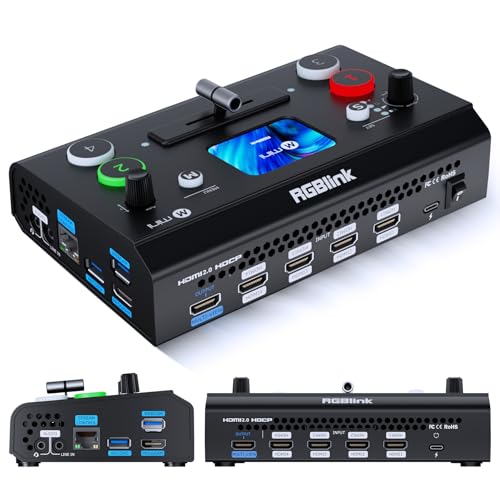
- Four HDMI inputs with dual HDMI outputs
- Touchscreen, T-bar, and UVC webcam mode
- Optional recording, PTZ, chroma key, and logo features
Best For: Portable church HDMI productions needing flexible controls
Best Flexible Hybrid Switcher

- Four SDI and four HDMI inputs plus NDI and playback
- Advanced keys, PIP, DSK, and multiple transitions
- Streams to up to three platforms
Best For: Churches using mixed SDI/HDMI sources and flexible streaming workflows
Best Compact HDMI Switcher

- Four HDMI inputs in a portable design
- Built-in 4-inch multiview display
- PTZ control, presets, keys, PIP, and AUX output
Best For: Small HDMI-based church productions and portable service setups
Best Advanced Production Switcher

- Four SDI and four HDMI inputs with NDI|HX3
- PTZ control, 5.5-inch display, and customizable outputs
- Simultaneous streaming and USB/SD recording
Best For: Larger churches with PTZ cameras and dedicated production teams
Best Compact Streaming Switcher – Blackmagic ATEM Mini Pro
The Blackmagic Design ATEM Mini Pro is a practical video switcher for church teams that need four-camera HDMI production, built-in streaming, and multiview monitoring in a compact unit. Its integrated controls cover transitions, keying, recording, and audio mixing without requiring a large production setup.
Best For: Churches running four-camera livestreams, presentations, education, or other compact productions.
Pros:
- Four HDMI inputs with 4-camera multiview support
- Built-in streaming, recording, and webcam output options
- Integrated six-input, two-channel audio mixer
- Includes transitions, upstream keys, and a downstream keyer
Cons:
- Limited to four HDMI video inputs
- Does not list PTZ control or portrait-production features
For a church that prioritizes straightforward HDMI switching and online delivery, the ATEM Mini Pro offers a strong feature set in a lightweight 1.2-pound chassis.
Best for Larger HDMI Productions – Roland V-8HD
The Roland V-8HD is a video switcher for church productions that need room to connect up to eight HDMI sources. It combines multi-view monitoring, flexible AUX routing, automated switching, graphics storage, and an 18-channel digital audio mixer for more involved live events.
Best For: Churches producing larger services, presentations, broadcasts, or events with multiple HDMI sources and audio channels.
Pros:
- Eight HDMI inputs support a broad source lineup
- Built-in multi-view preview monitor with external display support
- AUX output enables separate video routing
- Includes macros, presets, still storage, effects, and keying
Cons:
- Heavier and larger than compact four-input switchers
- Its HDMI-only workflow may not suit non-HDMI sources
The V-8HD is a capable choice when a church expects to expand beyond a basic camera setup and wants deeper routing, automation, and audio control in one production device.
Best All-in-One Church Streaming Deck – Osee GoStream Deck
The Osee GoStream Deck is a video switcher for church teams seeking an all-in-one workflow with HDMI switching, direct streaming, recording, playback, and graphics overlays. It adds Ethernet streaming, SD card or USB SSD recording, audio controls, and a physical T-bar for hands-on production.
Best For: Churches that want direct multi-platform streaming, portrait or landscape output, and integrated graphics and playback tools.
Pros:
- Four HDMI inputs and two HDMI outputs for source and monitoring flexibility
- Can stream to three platforms through Ethernet
- Supports SD card or USB SSD recording and MP4 playback
- Includes chroma key, PIP, overlays, macros, and physical PVW/PGM controls
Cons:
- Its broad feature set may require more setup and learning
- Four HDMI inputs may limit larger source configurations
With portrait support, direct RTMP streaming, and church-focused overlay capabilities, the GoStream Deck is a versatile option for ministries managing both in-person production and online content.
Best Built-In Monitoring Option – Mixer Plus 4-Channel Switcher
The Mixer Plus 4-Channel HDMI Video Switcher is a practical video switcher for church setups that benefit from an integrated 4.5-inch multiview display. It supports four HDMI sources, USB 3.0 UVC streaming, PTZ control, keying tools, portrait production, and flexible AUX output routing.
Best For: Churches that want compact four-source switching with built-in monitoring, OBS connectivity, and PTZ camera control.
Pros:
- Integrated display shows inputs, program, preview, resolution, and audio levels
- USB 3.0 UVC output works with OBS and compatible software without a capture card
- Supports VISCA over IP PTZ control and camera presets
- Offers chroma key, luma key, PIP, DSK, logo overlays, and portrait mode
Cons:
- Limited to four HDMI inputs
- PTZ control depends on compatible cameras and VISCA over IP
For a small church production desk, the built-in screen can simplify monitoring while USB UVC streaming and PTZ control reduce the need for additional hardware.
Hybrid Production Powerhouse – Osee GoStream Duet 8 ISO
For churches that need a flexible video switcher for church services, the Osee GoStream Duet 8 ISO combines HDMI and SDI inputs, giving you room to mix consumer, computer, and professional camera sources without separate converters. Its recording, audio, streaming, and graphics features are suited to more advanced worship productions.
Best For: Churches running multi-camera productions with mixed HDMI and SDI equipment.
Pros:
- Four HDMI 2.0 and four 3G-SDI inputs support mixed camera systems.
- Records eight ISO feeds plus the program output for editing or recovery.
- Built-in XLR audio processing includes phantom power, EQ, compression, and limiting.
- Supports NDI|HX, SRT, RTMP, USB UVC, and streaming to up to three RTMP destinations.
Cons:
- Its extensive feature set may require more setup and operator training.
- It outputs at up to 1080p despite accepting 4K HDMI signals.
The GoStream Duet 8 ISO is the strongest choice here for a church with a growing production team, multiple camera formats, and a need for ISO recording. It may be more switcher than a smaller congregation requires, but it offers substantial room to expand.
Simple Budget Switcher – FEELWORLD LIVEPRO L1 V1
The FEELWORLD LIVEPRO L1 V1 is a compact, approachable video switcher for church setups using up to four HDMI sources. Its USB 3.0 output appears as a webcam to a computer, making it practical for churches that want straightforward live streaming without a complex broadcast workflow.
Best For: Small churches and volunteer operators using HDMI cameras with computer-based streaming software.
Pros:
- Four HDMI inputs support multiple cameras, computers, presentations, or playback devices.
- USB 3.0 output connects to a computer as a webcam for streaming software.
- Compact design, built-in 2-inch display, and tripod mounting support portable setups.
- Provides preview, program, input monitoring, audio metering, and transition effects.
Cons:
- Its inputs and outputs are limited to HDMI-based workflows.
- The supplied notes specify 1080p support rather than 4K production.
- More advanced functions such as ISO recording or integrated XLR audio are not listed.
For a small sanctuary or volunteer-led livestream, the LIVEPRO L1 V1 keeps switching responsibilities manageable. It is best suited to uncomplicated HDMI systems rather than churches planning a larger SDI or broadcast-style upgrade.
Compact 4K Touch-Control Option – RGBlink Mini V3
The RGBlink Mini V3 is a compact video switcher for church teams that want four HDMI inputs, a touchscreen, and dual HDMI outputs in a small footprint. It also offers UVC webcam mode and optional recording, PTZ control, chroma key, and logo features through TAO Cloud activation.
Best For: Small to midsize churches wanting portable HDMI switching with room for optional creative features.
Pros:
- Four HDMI inputs and dual 1080p HDMI outputs support program and preview workflows.
- 2.1-inch touchscreen and professional T-bar provide hands-on control.
- UVC webcam mode works with computer-based platforms, while direct USB recording is available.
- Supports picture-in-picture, chroma key, logo overlays, and 15 transition effects, subject to activation where noted.
Cons:
- Recording and selected advanced features require optional TAO Cloud licensing.
- It requires a stable internet connection and firmware update for TAO Cloud activation.
- A 35W or higher USB-C power adapter is recommended for stable operation.
The Mini V3 balances portability with useful production controls, making it appealing when space and simplicity matter. Churches should factor in the optional licensing model before relying on recording, PTZ, or graphics features.
Best Flexible Hybrid Switcher – Osee GoStream Duet
Osee GoStream Duet Multiple Camera SDI and HDMI Live Stream Video Mixer Switcher
Check Price On AmazonIf you need a video switcher for church productions using a mix of SDI, HDMI, NDI, and playback sources, the Osee GoStream Duet offers a broad input range in a compact chassis. It supports up to three streaming platforms at once and can be controlled from its built-in interface, computer software, or Bitfocus Companion.
Best For: Churches and ministries running mixed SDI/HDMI multi-camera services that need flexible streaming and control options.
Pros:
- Supports four SDI, four HDMI, USB-C, NDI HX, and SD/SSD playback sources.
- Includes chroma key, luma key, pattern key, PIP, DSK, and several transition styles.
- Can stream to up to three platforms through Ethernet or a smartphone hotspot.
- Supports both landscape and portrait input and output formats.
Cons:
- The extensive source and effect options may require setup time for inexperienced operators.
- NDI HX requires downloading the latest firmware to unlock the included license.
The GoStream Duet is a strong fit when a church wants connectivity beyond basic HDMI switching. Its SDI capacity, NDI support, and multiple control methods provide room for a growing production workflow.
Best Compact HDMI Switcher – CINETREAK Mixer Plus
For a church seeking a video switcher for church services without a large rack setup, the CINETREAK Mixer Plus combines four HDMI inputs with a built-in 4-inch screen. Its multiview display, scene presets, and broadcast effects make it practical for small worship teams and portable productions.
Best For: Small churches, mobile ministry teams, classrooms, and events using up to four HDMI cameras or sources.
Pros:
- Built-in 4-inch multiview screen helps operators monitor inputs, program, preview, and audio levels.
- Offers four HDMI inputs with zero-latency switching and 30 transition effects.
- Includes four user-defined scene presets for repeatable service setups.
- Supports PTZ control over IP, chroma and luma keying, PIP, DSK, and logo overlays.
Cons:
- Its connectivity is limited to HDMI inputs rather than a combination of HDMI and SDI.
- The compact 4-inch monitor may be less comfortable for detailed monitoring than a larger external display.
The Mixer Plus is an approachable choice for HDMI-based worship systems. The integrated screen reduces the need for a separate multiview monitor, while the AUX output provides useful flexibility for different displays and production feeds.
Best Advanced Production Switcher – Tenveo PC500
The Tenveo PC500 is a video switcher for church teams that need professional multi-camera production, recording, and streaming in one system. It combines SDI and HDMI inputs, a 5.5-inch full-HD screen, PTZ camera control, NDI|HX3 support, and simultaneous recording and streaming capabilities.
Best For: Larger churches and production teams using PTZ cameras, SDI infrastructure, multichannel streaming, and recorded service backups.
Pros:
- Accepts four SDI, four HDMI, USB, and NDI|HX3 sources, with selected HDMI inputs supporting 4K60 input.
- Provides SDI, HDMI, AUX, and USB 3.0 outputs, with customizable output assignments.
- Supports PTZ control for up to four cameras, including presets and camera adjustment controls.
- Can stream to two platforms while recording through USB or SD-card storage.
Cons:
- Its professional feature set may be more than a small church needs for basic switching.
- Although it accepts 4K60 input, the stated program output is up to 1080p60.
- PTZ, NDI, recording, and network features require more planning and operator training.
The PC500 is the most production-oriented option in this roundup. Its combination of SDI, HDMI, PTZ control, network streaming, and recording makes it suitable for churches building a more structured broadcast workflow.
How We Picked the Best Video Switcher for Church
We focused on features that affect real church production: input type and count, switching control, output options, streaming support, monitoring, audio connectivity, portability, and ease of use. The list includes straightforward HDMI models for smaller sanctuaries as well as larger systems with SDI, ISO recording, XLR audio, and higher-resolution support.
Because church production often depends on volunteers, we also considered workflow simplicity. A switcher with clearly labeled controls, preview monitoring, and dependable presets can be more useful than a technically advanced unit that takes extensive training to operate.
Quick Comparison
| Best For | Look For |
|---|---|
| Small churches and basic streaming | Compact HDMI switcher, USB output, simple controls |
| Multi-camera worship services | Four or more inputs, multiview, transitions, and reliable preview |
| Long cable runs | SDI inputs and outputs, especially for cameras positioned far from the booth |
| Advanced recording workflows | ISO recording, multiple outputs, and strong storage or streaming options |
| Portable ministry events | Built-in screen, compact design, and flexible power or connection options |
Key Buying Factors for a Video Switcher for Church
Inputs and Camera Compatibility
Count your current cameras and leave room for expansion. HDMI is common in affordable cameras and short cable runs, while SDI is more suitable for professional cameras and longer distances. Check supported resolutions and frame rates before buying, particularly if your cameras output 4K or 1080p60.
Monitoring and Switching Workflow
A built-in screen or multiview output lets operators see all cameras, the program feed, and audio levels. Physical buttons are often easiest for volunteers, while touchscreen and software controls can provide more customization.
Streaming, Recording, and Outputs
Confirm whether the switcher can send video directly to your preferred streaming service or whether it needs a computer. USB webcam output is useful for streaming through software, while HDMI or SDI program outputs help connect confidence displays, recorders, and overflow screens.
Audio Integration
If the church already uses a mixing console, verify how the switcher accepts the audio feed. Models with dedicated audio inputs or XLR connectivity may simplify integration, but audio should still be monitored for delay, clipping, and synchronization.
Who Should Buy Which Video Switcher for Church?
Choose a compact HDMI switcher if you run a small livestream with two to four nearby cameras and want a manageable setup. Step up to a model with a built-in display when operators need quick visual monitoring without an additional monitor. Churches using long cable runs or professional cameras should prioritize SDI support. For larger teams producing several outputs or recording each camera independently, an ISO-capable system is the better long-term investment.
Before purchasing, map every connection from camera to switcher, audio console, streaming computer, recording device, and display. That simple diagram can reveal missing adapters, unsupported formats, or insufficient outputs and help ensure your new Video Switcher for Church fits the entire production system.