Wireless video transmitters can simplify camera monitoring, live production, presentations, and FPV flying—but the right system depends on more than advertised range. Resolution, latency, inputs, receiver support, and interference handling all affect real-world performance.
We selected 10 video transmitters under $500 across professional HDMI/SDI kits, compact camera transmitters, consumer HDMI extenders, and FPV-focused hardware. Use the guide below to match each type to your workflow and avoid paying for features you will not use.
Best 10 Video Transmitters Under 500 Picks for 2026
Best Multi-Receiver Pick

- 4K/30 HDMI transmission with 60ms latency
- Supports up to four receivers
- UVC streaming and HDMI loopout
Best For: Production teams and multi-viewer monitoring
Best FPV High-Power Option

- 2,000mW output for FPV applications
- 48 channels and 6V–6S support
- 5V, 500mA BEC output
Best For: RC racing, drones, and FPV builds
Best Plug-and-Play HDMI Extender
Vrriis WL081 Wireless HDMI Kit

- 1080p/60 transmission with claimed 0.05s latency
- HDMI loopout and IR remote support
- Claimed 1,300-foot open-field range
Best For: Home entertainment, offices, and presentations
Best Long-Range Professional System

- Claimed 3km range with 35ms latency
- 1080p/60 video at up to 20Mbps
- HDMI, SDI, and USB-C monitoring
Best For: Professional crews and long-distance monitoring
Best Mobile Monitoring Pick
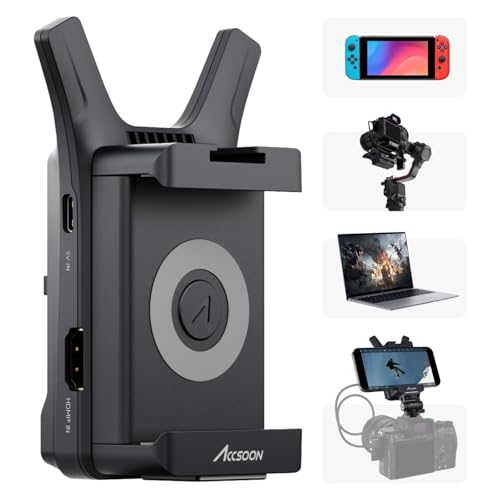
- Sends 1080p60 video to up to four mobile devices
- Compact 72.3g design with USB-C or NP-F power
- Accsoon SEE adds monitoring and RTMP streaming features
Best For: Portable camera monitoring with phones and tablets
Best Pocket 3 Streaming Kit

- Built for DJI Osmo Pocket 3 with Type-C connectivity
- UVC output supports up to 1080p60 computer streaming
- One transmitter can support up to five receivers
Best For: Pocket 3 live streaming and multi-screen monitoring
Best Home and Office Extender

- Plug-and-play setup without Wi-Fi, apps, or Bluetooth
- Outputs 1080p60 and supports 4K source decoding
- Stated wireless range reaches up to 328 feet
Best For: Presentations, home viewing, and wireless display extension
Professional 4K Pick

- 4K HDMI transmission up to 30 fps
- HDMI and 3G-SDI input/output
- 450-foot stated LOS range
Best For: Professional camera and on-set monitoring workflows
Simple Presentation Pick

- Pre-paired plug-and-play setup
- 4K decoding with 1080p/60Hz output
- 328-foot stated open-area range
Best For: Presentations, classrooms, and everyday HDMI sharing
Multi-Viewer Production Pick
Wireless HDMI System with 7-inch Monitor
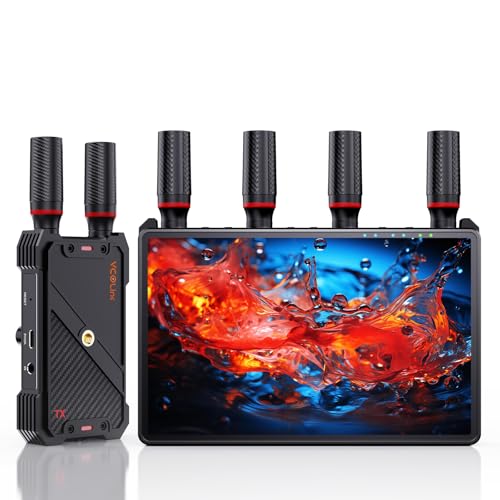
- Built-in 7-inch receiver monitor
- 1-to-5 receiver expansion
- 1,312-foot stated LOS range
Best For: Film crews, live production, and multi-person monitoring
Best Multi-Receiver Pick – Hollyland Pyro H
For buyers comparing video transmitters under 500, the Hollyland Pyro H stands out as a capable HDMI system for professional monitoring and streaming. It supports up to 4K/30 video, dual-band operation, a claimed 1,300-foot range, and 60ms latency.
Best For: Film crews, live streamers, and production teams that need multiple receivers and flexible monitoring.
Pros:
- Supports HDMI input, output, and loopout with up to 4K/30 transmission.
- Transmits to up to four receivers and supports Hollyview app monitoring.
- Offers 2.4GHz/5GHz dual-band operation and Smart Channel Scan.
- Includes UVC support for plug-and-play computer streaming.
Cons:
- Its 60ms latency is higher than the lowest-latency monitoring systems.
- The listed 1,300-foot range depends on operating conditions.
The Pyro H is a strong choice when collaborative monitoring and connectivity matter more than minimizing latency. Its HDMI loopout and UVC support also make it more versatile than a basic point-to-point transmitter.
Best FPV High-Power Option – 5.8GHz 2W FPV Transmitter
Among video transmitters under 500, this compact FPV unit is designed for RC racing and drone applications rather than HDMI camera workflows. It delivers 2,000mW output, 48 channels, and compatibility with 6V to 6S batteries.
Best For: FPV pilots and RC builders seeking a high-power 5.8GHz analog video transmitter.
Pros:
- Provides 2,000mW output for FPV video transmission.
- Offers 48 channels for frequency selection.
- Supports 6V to 6S battery input.
- Includes a 5V BEC output rated at 500mA.
Cons:
- It is an FPV AV transmitter, not a wireless HDMI system.
- The high-power design may require careful antenna and power setup.
- Its supplied notes do not specify a guaranteed real-world range.
This transmitter makes the most sense for experienced FPV users who understand analog video wiring, antennas, and battery requirements. It is not the right match for TV, projector, or DSLR HDMI extension.
Best Plug-and-Play HDMI Extender – Vrriis WL081 Wireless HDMI Kit
If you are shopping for video transmitters under 500 for home, office, or presentation use, the Vrriis WL081 offers a straightforward wireless HDMI connection. It supports 1080p/60, loopout, IR remote control, and a claimed 1,300-foot open-field range.
Best For: Connecting laptops, set-top boxes, cameras, or media devices to a distant TV or projector.
Pros:
- Plug-and-play setup requires no software installation.
- Supports 1080p/60 video with claimed 0.05-second latency.
- Provides transmitter-side HDMI loopout for a local display.
- Includes IR support for controlling the source remotely.
Cons:
- It is limited to Full HD rather than 4K transmission.
- Walls, metal, glass, and other obstacles can reduce coverage.
- The notes indicate that adding receivers can reduce transmission distance.
The WL081 is a practical choice for everyday HDMI extension when ease of installation is the priority. Its loopout and IR features add useful flexibility for presentations and multi-room entertainment.
Best Long-Range Professional System – DJI SDR Transmission Combo
For buyers evaluating video transmitters under 500 for demanding wireless monitoring, the DJI SDR Transmission Combo emphasizes range and interference resistance. It supports 1080p/60 video, up to 20Mbps bitrate, 35ms latency, and a claimed 3km transmission distance.
Best For: Professional crews needing long-range camera monitoring, strong penetration, and flexible receiver access.
Pros:
- Supports 1080p/60 video at up to 20Mbps with 35ms latency.
- Uses automatic frequency hopping across 2.4GHz, 5.8GHz, and DFS bands.
- Offers HDMI, SDI, and USB-C monitoring options.
- Broadcast mode allows an unlimited number of receivers according to the supplied notes.
Cons:
- It does not provide 4K transmission.
- The claimed 3km range will depend on the shooting environment.
- Its advanced feature set may be more than casual users need.
The DJI system is the strongest fit here for extended professional monitoring and complex locations. Its SDR transmission, multiple output options, and broadcast mode make it especially appealing for larger crews and live production workflows.
Best Mobile Monitoring Pick – Accsoon CineView Nano
For creators comparing video transmitters under 500, the Accsoon CineView Nano is a compact HDMI option focused on mobile monitoring. It can send 1080p video at up to 60 frames per second to as many as four iOS or Android devices through the Accsoon SEE app.
Best For: Photographers and video crews that need lightweight, multi-device monitoring from a camera or gimbal.
Pros:
- Supports transmission to up to four iOS or Android devices.
- Offers 1080p60 transmission with latency under 0.06 seconds and a stated range of up to 150 meters.
- Compact 72.3-gram aluminum design with USB-C or NP-F battery power options.
- Accsoon SEE supports monitoring, recording, LUTs, overlays, and RTMP live streaming.
Cons:
- HDMI cables, NP-F batteries, and charging cables are sold separately.
- Mobile video monitoring uses the phone’s Wi-Fi connection, so live streaming requires a separate 5G network.
The CineView Nano is a practical choice when portability and phone-based monitoring matter more than a traditional dedicated receiver. Its standard FHD HDMI compatibility also suits cameras, DSLRs, and supported gimbals.
Best Pocket 3 Streaming Kit – Vrriis Wireless HDMI System
Among video transmitters under 500, this Vrriis kit stands out for its DJI Osmo Pocket 3 support and receiver-side UVC output. It combines 1080p wireless HDMI transmission with direct computer connectivity for webcam-style streaming.
Best For: Osmo Pocket 3 users, live streamers, and presenters who need wireless display transmission plus computer-based UVC output.
Pros:
- Designed for the DJI Osmo Pocket 3 with a built-in Type-C transmitter connection.
- Receiver UVC output supports up to 1080p60 streaming to a computer through USB 3.0.
- Provides 20 adjustable channels, status information on an LCD screen, and automatic channel matching.
- Supports one transmitter to up to five receivers and includes HDMI loopout for local monitoring.
Cons:
- The stated 1,640-foot range applies to open, unobstructed conditions; walls and metal can reduce coverage.
- NP-F batteries are not included.
With UVC output, multi-receiver support, and HDMI loopout, this is a versatile option for Pocket 3 broadcasts, classrooms, conferences, and multi-screen monitoring. Its usefulness is strongest when the transmitter and receiver have a clear line of sight.
Best Home and Office Extender – Futureagle Wireless HDMI Kit
For buyers comparing video transmitters under 500 for home or office use, the Futureagle S8 emphasizes simple setup and long-range display extension. It connects without Wi-Fi, apps, or Bluetooth and delivers 1080p video at 60Hz from compatible HDMI sources.
Best For: Wireless presentations, home entertainment, classroom display, surveillance viewing, and HDMI-equipped PCs, projectors, and monitors.
Pros:
- Plug-and-play connection is designed to establish a link in about three seconds.
- Decodes 4K source content and outputs 1080p at 60Hz.
- Offers a stated range of up to 328 feet and supports operation through two walls under suitable conditions.
- Includes Mini/Micro HDMI adapters and a USB-C extension cable for broader device compatibility.
Cons:
- Output resolution is 1080p even when the source content is 4K.
- Wireless performance can vary with walls and other environmental conditions.
The S8 is geared toward convenience rather than camera-production features. Its display status screen, extended-display support, and transmission pause button make it especially practical for office presentations and everyday wireless screen sharing.
Professional 4K Pick – Hollyland Mars 4K
For shoppers comparing video transmitters under 500, the Hollyland Mars 4K stands out when you need both 4K HDMI connectivity and professional SDI support. It transmits up to 4K at 24, 25, or 30 fps, while supporting 1080p and 720p formats through HDMI or SDI.
Best For: Camera crews, on-set monitoring, and users who need HDMI and SDI flexibility.
Pros:
- Supports up to 4Kp30 video transmission through HDMI.
- Includes HDMI and 3G-SDI input/output with support for decimal-point frame rates.
- Offers a stated 450-foot line-of-sight range and 66ms latency in interference-free conditions.
- Supports up to four app monitoring devices when used without the receiver.
Cons:
- The stated range and latency depend on interference-free laboratory conditions.
- QC/PD charging protocols and 5V/2A charging are not supported.
- Its professional SDI-focused feature set may be more than casual users need.
The Mars 4K is the strongest choice here for production workflows that require higher-resolution video and SDI compatibility. Its app monitoring and multiple power options add flexibility, though the system is best suited to users who will take advantage of its professional connections.
Simple Presentation Pick – Wireless HDMI 4K Extender
If you want one of the more straightforward video transmitters under 500, this wireless HDMI kit emphasizes plug-and-play setup. The pre-paired transmitter and receiver support 4K decoding and 1080p output at 60Hz for presentations, classrooms, and home media setups.
Best For: Wireless connections between computers, projectors, TVs, monitors, and other HDMI devices.
Pros:
- Pre-paired design requires no Wi-Fi, app, Bluetooth, or complex configuration.
- Supports 4K decoding with 1080p at 60Hz output.
- Uses dual-band 2.4GHz and 5GHz transmission with a stated 328-foot open-area range.
- Includes Mini HDMI and Micro HDMI adapters for broader source compatibility.
Cons:
- Both the transmitter and receiver must be powered for operation.
- Obstacles such as walls, floors, and ceilings can reduce transmission distance.
- The system outputs 1080p rather than 4K.
This kit is a practical choice when ease of use matters more than professional production features. Its dual-band connection and included adapters make it convenient for everyday HDMI sharing, but the 1080p output limit should be considered if you need a native 4K display feed.
Multi-Viewer Production Pick – Wireless HDMI System with 7-inch Monitor
Among video transmitters under 500, this system is designed for collaborative filming and live production. It combines a built-in 7-inch receiver monitor with 1080p/60Hz transmission, HDMI loop out, and support for one transmitter broadcasting to as many as five receivers.
Best For: Film crews, live events, and shoots where multiple people need to monitor the same camera feed.
Pros:
- Receiver includes a built-in 7-inch HD monitor for standalone viewing.
- Supports 1080p at 60Hz with stated range up to 1,312 feet line of sight.
- One transmitter can broadcast to up to five receivers.
- Includes HDMI loop out, IR remote control, and NP-F, power-bank, or USB-C power options.
Cons:
- The listed long range is specified for line-of-sight use.
- An HDMI cable for external monitor output is not included.
- A Type-C-to-HDMI cable is required for smartphone or tablet compatibility.
The built-in screen and expandable receiver support make this a particularly capable option for shared monitoring without adding a separate field monitor. It is limited to 1080p, but its multi-viewer design and flexible mounting and power options fit demanding on-set workflows.
How We Picked the Best Video Transmitters Under 500
We compared these systems by looking at the features that most directly affect usability: supported resolution and frame rates, transmission range, latency, input and output types, receiver capacity, power options, and setup complexity. We also considered the intended use case. A low-latency FPV transmitter has different priorities from an HDMI extender for a television or a production kit for camera crews.
Advertised distance is a best-case figure and can change with walls, other wireless networks, antenna placement, regional restrictions, and line of sight. We therefore treated range claims as useful comparisons rather than guaranteed operating distances.
Quick Comparison
| Best For | What to Prioritize | Typical Choice |
|---|---|---|
| Professional video production | HDMI/SDI support, stable links, monitoring options | Hollyland Mars 4K or DJI SDR Transmission |
| Compact camera rigs | Small size, low power draw, phone or monitor compatibility | Accsoon CineView Nano |
| Home, office, or classroom HDMI | Plug-and-play setup, loop-out, compatible resolutions | Wireless HDMI extender kits |
| FPV drones and RC vehicles | Very low latency, suitable bands, antenna and power support | Dedicated FPV transmitter |
| Multi-viewer setups | Multiple receivers, monitor support, reliable distribution | Multi-receiver kits |
Key Buying Factors for Video Transmitters Under 500
Resolution, Frame Rate, and Inputs
Check whether the transmitter accepts the camera’s actual output. Some units transmit 4K at 30 frames per second but limit 1080p to specific frame rates. HDMI is common for mirrorless cameras, laptops, and consumer devices, while SDI is valuable for production cameras and longer cable runs. A loop-out is useful when you need to send video wirelessly while retaining a local monitor.
Latency and Stability
For interviews, live switching, and focus pulling, lower latency makes monitoring feel more responsive. FPV flying requires especially fast response. Stability matters just as much: dual-band operation, channel selection, interference resistance, and clear line of sight can be more valuable than the longest range claim.
Range, Receivers, and Power
Choose a system with enough range for your location, but leave a safety margin. Determine whether the kit includes both a transmitter and receiver, how many receivers it supports, and whether extra receivers are affordable. Also verify battery, USB, DC, or camera-battery compatibility before buying for field work.
Compatibility and Setup
Confirm connector types, HDCP limitations, audio handling, UVC support, monitor compatibility, and operating-band requirements. Plug-and-play extenders are convenient, but professional systems may offer better control and monitoring at the cost of a more involved setup.
Who Should Buy Which Video Transmitters Under 500?
Choose a professional Hollyland or DJI system if you need dependable camera monitoring, multiple viewing points, or SDI/HDMI flexibility. The Accsoon transmitter is a sensible direction for compact rigs where size and power consumption matter. For laptops, set-top boxes, projectors, and televisions, a straightforward 2.4GHz/5GHz HDMI extender is usually the better value.
FPV pilots should prioritize dedicated low-latency hardware rather than a general-purpose HDMI kit. If you need several displays or remote operators, select a system designed for multiple receivers or bundled monitors. Finally, verify local wireless regulations and test the link in the actual environment before relying on it for a live event.