The right capture card can turn a gaming PC into a reliable streaming and recording setup without forcing you to compromise on resolution, frame rate, or latency.
We selected 10 capture cards for PC spanning internal PCIe models, portable USB devices, 1080p60 options, and higher-end 4K passthrough hardware.
Best 10 Capture Cards for PC Picks for 2026
Premium Internal Pick

- 4K60 HDR10 capture with 8K60 passthrough
- HDMI 2.1, VRR, and up to 1080p240 recording
- Supports streaming apps and dual-PC setups
Best For: High-end Windows desktop streaming
Budget USB Starter

- 4K30 input with up to 1080p60 output
- Plug-and-play and portable design
- Broad OS, console, and software compatibility
Best For: Beginner streaming and portable recording
4K HDR Internal Classic

- 4K60 HDR10 capture with zero-lag passthrough
- High-frame-rate capture up to 240 fps
- Designed for Windows desktop console streaming
Best For: Dedicated Windows 4K HDR setups
Flexible USB-C Option
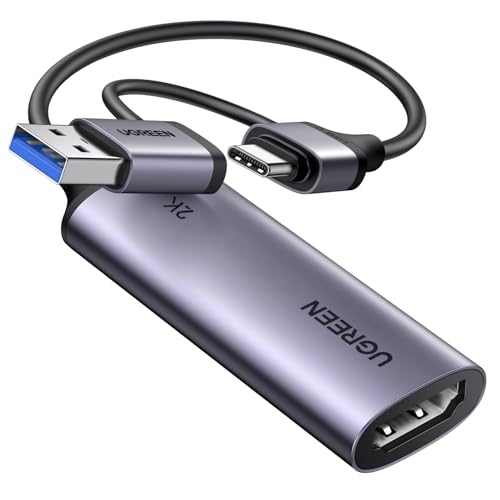
- 4K30 input with 2K30 or 1080p60 output
- USB-A and USB-C connectivity
- Supports PCs, consoles, mobile devices, and iPadOS 17+
Best For: Multi-device and USB-C streaming setups
Premium 4K Capture

- 4K60 capture with HDR10 support
- 1440p120 and 1080p240 passthrough
- 3.5mm analog audio input
Best For: High-refresh console capture and advanced PC streaming setups
Versatile Budget Capture
XIIXMASK USB 3.0 HDMI Capture Card

- 1080p60 or 2K30 capture
- 4K60 HDMI loop-out
- USB-A/USB-C and mic-in support
Best For: Flexible Full HD streaming across consoles, PCs, and cameras
Compact Portable Capture

- 4K60 HDR passthrough
- 1080p60 capture
- Compact 93 g design
Best For: Portable laptop, PC, Mac, or iPad-based console streaming
Best PCIe Performance
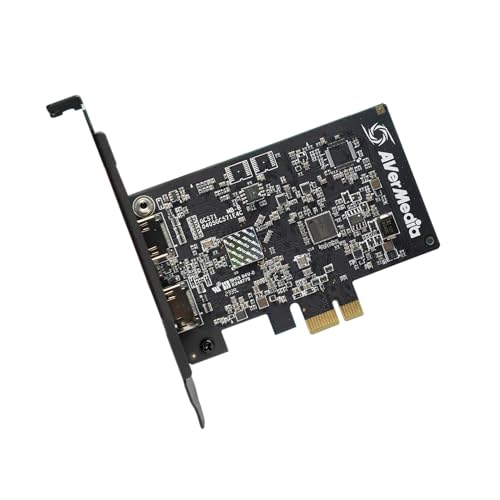
- 4K30 capture with 4K60 pass-through
- VRR and 1080p120 support
- Drive-free PCIe installation
Best For: Desktop streamers wanting smooth, high-resolution pass-through
Best Budget Flexibility

- 4K60 loop-out with 1080p60 capture
- USB 3.0 plug-and-play setup
- Mic input and wide OS compatibility
Best For: Flexible console, camera, and PC streaming setups
Best RGB Setup
Fifine AmpliGame V3 Capture Card

- 1080p60 USB 3.0 capture
- 4K30 zero-latency loop-out
- Nine RGB lighting modes and audio ports
Best For: Streamers building a stylish 1080p gaming setup
Premium Internal Pick – Elgato 4K Pro
For demanding PC setups, the Elgato 4K Pro is one of the most capable capture cards for PC. Its HDMI 2.1 connectivity supports 4K60 HDR10 capture, 8K60 passthrough, and high-frame-rate recording up to 1080p240, while VRR passthrough helps keep gameplay smooth.
Best For: PC streamers and dual-PC creators who want high-end console or gaming-PC capture with flexible passthrough.
Pros:
- Captures 4K60 HDR10 and supports up to 1080p240 recording.
- HDMI 2.1 passthrough supports 8K60 and VRR.
- Works with popular streaming apps and supports dual-PC setups.
Cons:
- Requires a Windows 10 PC with an available PCIe slot.
- Its 1080p capture-resolution specification may require careful configuration for different workflows.
The Elgato 4K Pro is a strong choice when performance, low latency, and advanced HDMI 2.1 features matter more than portability. It is best suited to a properly equipped desktop rather than a simple plug-and-play setup.
Budget USB Starter – 4K USB 3.0 Capture Card
This compact USB model is a practical option for shoppers seeking affordable capture cards for PC. It accepts up to 4K30 HDMI input and outputs up to 1080p60 or 2K30, with USB 3.0, USB-C, and broad compatibility across computers, consoles, cameras, and streaming software.
Best For: Beginners who need a portable, driver-free capture device for streaming, recording, meetings, or online teaching.
Pros:
- Supports up to 1080p60 output and 4K30 input.
- Plug-and-play design requires no additional drivers or external power.
- Compatible with Windows, macOS, Linux, Android, major consoles, OBS, and Zoom.
Cons:
- Requires capture software and cannot directly cast to a monitor or TV.
- HDMI-to-USB is one-way, and USB 2.0 connections can limit performance.
- Audio setup in OBS may require restarting the software.
Its small size and included USB adapter make this capture card easy to move between setups. Use a USB 3.0 port whenever possible, and expect the usual millisecond-level latency associated with video decoding.
4K HDR Internal Classic – AVerMedia Live Gamer 4K
The AVerMedia GC573 remains a capable internal option among capture cards for PC, offering 4K60 HDR10 capture with zero-lag passthrough. It also supports high-frame-rate capture up to 240 fps and works with current consoles and common broadcasting tools such as OBS, Streamlabs, and XSplit.
Best For: Windows desktop users recording or streaming 4K HDR gameplay from PS5, Xbox Series X/S, or other supported sources.
Pros:
- Captures 4K60 HDR10 with zero-lag passthrough.
- Supports high-frame-rate capture up to 240 fps.
- Includes customizable RGB lighting and a three-year manufacturer warranty.
Cons:
- Requires a PCIe x4 slot and a relatively powerful Windows PC for 4K60 HDR.
- It is an internal card, so it is not suited to portable setups.
- Its listed operating-system support is Windows 10 and Windows 11.
The GC573 makes sense for a dedicated Windows streaming or recording computer with enough CPU, GPU, memory, and PCIe capacity. Its zero-lag passthrough and HDR support are especially useful for next-generation console workflows.
Flexible USB-C Option – UGREEN 2K Capture Card
UGREEN’s compact device is a flexible choice for capture cards for PC when you want USB-A and USB-C connectivity. It accepts 4K30 HDMI input and outputs up to 2K30 or 1080p60, while supporting computers, phones, tablets, consoles, cameras, and software such as OBS and QuickTime Player.
Best For: Streamers who switch between modern USB-C devices, traditional USB-A computers, consoles, and mobile or tablet workflows.
Pros:
- Offers 4K30 input, 2K30 output, and 1080p60 compatibility.
- Includes both USB-A and USB-C interfaces with 5 Gbps USB 3.0 transfer.
- Supports Windows, macOS, Linux, iPadOS 17 or later, and Android-related setups.
Cons:
- Supports HDMI input to USB output only.
- iPad USB-C use requires iPadOS 17 or later.
- Console sources may require HDCP to be disabled.
With broad device support and a durable aluminum housing, the UGREEN is well suited to mixed-device streaming. Check your source resolution, USB port, and HDCP settings before buying to avoid compatibility surprises.
Premium 4K Capture – Elgato 4K S
For creators who want high-end capture cards for PC, the Elgato 4K S combines 4K60 recording with high-frame-rate passthrough and HDR10 support. It is designed for Windows 11, macOS 13 or later, and compatible USB-C iPadOS devices.
Best For: Gamers capturing PS5, Xbox Series X/S, or Switch 2 gameplay while playing at high refresh rates.
Pros:
- Captures video at up to 4K60.
- Supports 1440p120 and 1080p240 passthrough for high-frame-rate gaming.
- HDR10 capture with tone mapping on Windows.
- Includes a 3.5mm analog audio input for commentary or in-game chat capture.
Cons:
- Requires relatively current hardware, including Windows 11, macOS 13 or later, or compatible iPadOS devices.
- Its listed video capture resolution is 1080p despite 4K60 capture support in the product highlights.
The 4K S is a strong choice when passthrough quality and high refresh rates matter as much as recording. Its USB-C connection and analog audio input also make it flexible for a PC-based streaming setup.
Versatile Budget Capture – XIIXMASK USB 3.0 HDMI Capture Card
This XIIXMASK model is a practical option among capture cards for PC, offering 1080p60 or 2K30 capture, 4K60 HDMI passthrough, and USB-A/USB-C connectivity. It also supports microphone input for commentary and works with common streaming software such as OBS Studio.
Best For: Console players and streamers seeking flexible connections, 4K passthrough, and straightforward 1080p recording.
Pros:
- Captures up to 1080p60 or 2K30 while supporting 4K60 HDMI loop-out.
- Dual USB-A/USB-C compatibility simplifies connection to different computers.
- 3.5mm mic-in supports voice commentary.
- Works with Windows, macOS, Linux, Android, iPadOS 17+, OBS Studio, Zoom, and other listed platforms.
Cons:
- The product notes state that the mic input does not record party chat.
- OBS may need to be restarted after audio setup to restore sound output.
- Requires a Windows operating system according to the minimum system requirements, despite broader compatibility claims.
With its broad device support and included USB 3.0 cable, this capture card offers useful flexibility for mixed PC, console, and camera setups. It is best suited to Full HD streaming rather than native 4K recording.
Compact Portable Capture – Elgato Game Capture Neo
The Elgato Game Capture Neo is a compact choice among capture cards for PC, measuring about the size of a smartphone while providing 4K60 HDR passthrough and 1080p60 capture. Its low-latency design works with OBS Studio, QuickTime, Discord, Teams, and Zoom.
Best For: Portable console capture for users who want a small setup that works with laptops, PCs, Macs, iPads, and supported smartphones.
Pros:
- Compact design with a listed weight of 93 g.
- Passes through 4K60 HDR while capturing Full HD at 1080p60.
- Supports PlayStation, Xbox, Switch, iPhone, PC, Mac, and iPad setups.
- Offers ultra-low-latency gameplay without subscriptions, watermarks, or time limits.
Cons:
- Capture resolution is limited to 1080p according to the listed specifications.
- The supplied notes do not list a dedicated analog microphone input.
- Its listed operating-system support begins with Windows 10 and macOS Monterey 12.
The Game Capture Neo prioritizes portability and simple compatibility over 4K recording. It is a sensible fit for creators who want to preserve 4K HDR gameplay on their display while sending a manageable 1080p60 feed to a computer or streaming app.
Best PCIe Performance – Live Streamer Ultra HD GC571
For PC builders seeking capture cards for PC setups, the AVerMedia GC571 is a strong internal option. It captures up to 4K at 30fps, supports 4K60 pass-through, and adds VRR and 1080p120 support for smooth gameplay.
Best For: Gamers who want a high-performance PCIe capture card with 4K pass-through and high-frame-rate support.
Pros:
- Captures 4K video at up to 30fps.
- Supports 4K60 pass-through, VRR, and 1080p120 gameplay.
- Drive-free installation with PCIe x1, x4, x8, and x16 slot compatibility.
Cons:
- Requires an available PCIe slot inside a desktop PC.
- Its capture resolution is lower than its 4K60 pass-through resolution.
The GC571 is best suited to desktop streamers who prioritize smooth pass-through and high-resolution gaming. Its internal design is less flexible than a USB model, but it offers broad PCIe compatibility and a streamlined installation.
Best Budget Flexibility – VIXLW 4K HDMI Capture Card
This VIXLW model is a versatile choice among capture cards for PC, combining USB 3.0 connectivity with 4K60 HDMI loop-out and up to 1080p60 capture. Its mic input and wide operating-system compatibility make it useful for gaming, meetings, and basic recording.
Best For: Buyers who want an affordable external capture card with loop-out, microphone input, and broad device compatibility.
Pros:
- Supports 4K60 input and loop-out with 1080p60 capture.
- Includes USB 3.0 connectivity, a 3.5mm mic input, and low-latency pass-through.
- Works with Windows, macOS, Linux, Android, consoles, cameras, and common streaming software.
Cons:
- Does not support 4K120 or 4K144 input.
- The mic input accepts a 3.5mm microphone headset and does not record party chat.
- Audio setup may require restarting OBS.
With its broad compatibility and useful loop-out features, this is a practical external option for mixed-device households. It is particularly appealing when 1080p60 capture is sufficient and you want simple USB connectivity.
Best RGB Setup – Fifine AmpliGame V3 Capture Card
The Fifine AmpliGame V3 is a compact external option for capture cards for PC, delivering 1080p60 capture over USB 3.0 and 4K30 HDMI loop-out. It also adds headset and line-in connections plus customizable RGB lighting for a more polished streaming desk.
Best For: Streamers who want straightforward 1080p60 capture, zero-latency pass-through, and integrated audio connections with RGB styling.
Pros:
- Captures smooth 1080p video at 60fps.
- Provides 4K30 HDMI loop-out for delay-free gameplay.
- Includes line-in, headset ports, plug-and-play USB operation, and nine RGB modes.
Cons:
- Capture resolution is limited to 1080p.
- Requires USB 3.0 and HDMI input/output connections.
- The manufacturer recommends using the included original USB cable for best performance.
The AmpliGame V3 balances core streaming features with desk-friendly extras. It is a good fit for creators who do not need 4K recording but value smooth 1080p60 footage, simple setup, audio ports, and customizable lighting.
How We Picked the Best Capture Cards for PC
We compared these Capture Cards for PC by looking at their capture resolution, passthrough limits, supported frame rates, connection type, latency claims, compatibility, and intended use. We also separated internal PCIe cards from USB models because installation, portability, and performance can differ significantly.
Specifications matter, but the best choice depends on the complete signal path. A card may accept a 4K input while capturing at 1080p, or provide 4K passthrough without recording 4K footage. Check both figures before buying.
Quick Comparison
| Type | Best For | Main Advantage | Potential Trade-Off |
|---|---|---|---|
| Internal PCIe | Permanent desktop setups | High bandwidth and low clutter | Requires installation and an open slot |
| USB 3.0 | Portable or flexible setups | Easy connection to compatible PCs | Performance depends on the USB port and system |
| 4K-capable | Modern consoles and high-resolution sources | Higher-quality passthrough or capture | Usually costs more and needs stronger hardware |
| 1080p60 | Most streaming and recording | Good quality with manageable file sizes | Not ideal for 4K production workflows |
Key Buying Factors for Capture Cards for PC
Capture Resolution and Frame Rate
For standard livestreaming, 1080p at 60 frames per second is a practical target. Choose a 4K-capable model if you record high-resolution gameplay, produce edited video, or want more flexibility for future consoles and displays.
Passthrough Performance
Passthrough lets you play on a monitor or TV while the card sends a separate signal to the PC. Look for support for your preferred resolution, refresh rate, HDR format, and variable-refresh features. Capture and passthrough specifications are not always identical.
Internal or USB Design
Internal cards are suited to desktop PCs that remain in one location and often provide a clean, high-bandwidth setup. USB capture cards are easier to move between computers and work well for laptops, temporary setups, and creators who travel.
Compatibility and Latency
Confirm that your PC has the required PCIe slot or USB standard and that your streaming software supports the device. Low latency is particularly important for gameplay monitoring, although playing through passthrough is generally preferable to monitoring the preview window.
HDMI and Audio Details
Check the HDMI version, input and output behavior, audio support, and whether protected content restrictions affect your source. A capture card is designed for compatible unprotected signals, not every HDMI device.
Who Should Buy Which Capture Cards for PC?
Choose an Internal Card for a Dedicated Streaming PC
An internal PCIe model makes the most sense for a desktop setup that stays assembled. It is a strong fit for creators who want a tidy installation, sustained performance, and support for demanding console or camera signals.
Choose USB for Portability and Simplicity
A USB model is better when you switch between computers, use a laptop, or want to avoid opening a case. Prioritize USB 3.0 connectivity and plug it directly into a suitable port rather than relying on an overloaded hub.
Choose 1080p60 for Straightforward Streaming
If your audience watches primarily in 1080p, a 1080p60 capture card can deliver smooth footage while keeping bandwidth, storage, and editing requirements reasonable.
Choose 4K Capability for Long-Term Flexibility
Invest in 4K input or passthrough when you use a PS5, Xbox Series X/S, high-resolution camera, or 4K display. Verify the exact HDR and refresh-rate support you need before checkout, since “4K” alone does not describe the full feature set.